Workflow Patterns in AI Systems
Apart from writing single functions for each task, we can combine function through static workflows and achieve more complex tasks. Workflow patterns are mostly static and reusable structures that chain, route, or parallelize LLM steps. Beyond single-prompt calls, real applications often need workflow patterns. This post covers three core workflow patterns:
1. Sequential Chaining
2. Routing
3. Parallelization
with LangGraph-style graphs and practical use cases.
Implementations use LangGraph’s StateGraph, nodes, and edges so you can run them with invoke() or ainvoke().
Prerequisites: Basic understanding of LangGraph.
Code Examples: View on GitHub ↗
1. Sequential Chaining
Step A → Step B → Step C
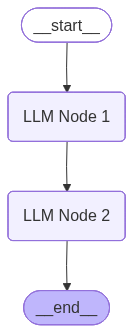
In Sequential Chaining, steps run one after another. The output of each node becomes input to the next. There are no branches or conditionals—just a linear pipeline: Node 1 → Node 2 → … → END.
State: A TypedDict holds all data passed through the pipeline (e.g. a translation + summarization pipeline will have original_text, summary, translation, current_step). Each node reads from state, does its work (e.g. call an LLM), and returns a partial update that gets merged into the state for the next node.
from langgraph.graph import StateGraph, END, START
from typing import TypedDict

class WorkflowState(TypedDict):
    original_text: str
    summary: str
    translation: str
    current_step: str

workflow = StateGraph(WorkflowState)
workflow.add_node("LLM Node 1", summarize_node)
workflow.add_node("LLM Node 2", translate_node)
workflow.set_entry_point("LLM Node 1")
workflow.add_edge("LLM Node 1", "LLM Node 2")
workflow.add_edge("LLM Node 2", END)
app = workflow.compile()
Use one LLM to summarize, another to translate; or outline → verify alignment → generate content. Sequential chaining is ideal for document writing, multi-step data processing, and any pipeline where order matters.
Use cases:
- 1. Document writing: LLM 1 outlines topics → LLM 2 verifies topic alignment with the subject → LLM 3 generates the final content.
- 2. Multi-step data processing: Extract information → transform it → then summarize it in sequence.
Implementation: View on GitHub
2. Routing
One input → one of many paths
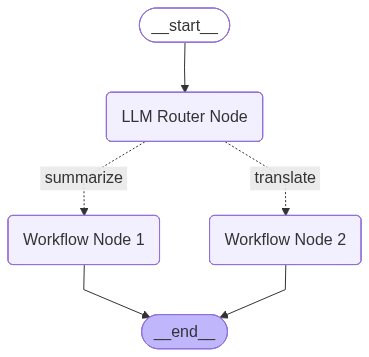
Routing pattern sends each request down exactly one path based on a decision. A router node (or LLM/classifier) inspects the input and chooses which branch to take—e.g. Billing, Operations, or Technical Support for tickets; or a small vs. large model for simple vs. complex queries.
State: LangGraph State typically includes the input (e.g. query, original_text), any router output (e.g. decider, route), and result fields. A decision node returns a string that maps to the next node via add_conditional_edges. Each branch can be a different node (e.g. summarize_node, translate_node), and all branches usually converge at END.
def decision_maker(state: WorkflowState) -> str:
    if state["decider"] meets some condition:
        return "Workflow Node 1"
    return "Workflow Node 2"

workflow = StateGraph(WorkflowState)
workflow.add_node("LLM Router Node", router_node)
workflow.add_node("Workflow Node 1", summarize_node)
workflow.add_node("Workflow Node 2", translate_node)
workflow.set_entry_point("LLM Router Node")
workflow.add_conditional_edges("LLM Router Node", decision_maker, {
    "summarize": "Workflow Node 1",
    "translate": "Workflow Node 2"
})
workflow.add_edge("Workflow Node 1", END)
workflow.add_edge("Workflow Node 2", END)
app = workflow.compile()
The router can be rule-based (keywords, metadata) or LLM-based (classify intent). Routing keeps cost and latency low by sending each request to the right specialist or model size.
Use cases:
- 1. Customer support tickets: Route to specialised Billing, Operations, or Technical Support based on ticket content or intent.
- 2. Model selection: Route simpler user queries to smaller, cheaper models (e.g. Llama 8B) and complex queries to more capable, reasoning-enabled models (e.g. Claude Sonnet 4.5).
Implementation: View on GitHub
3. Parallelization
Fan-out → process → aggregate
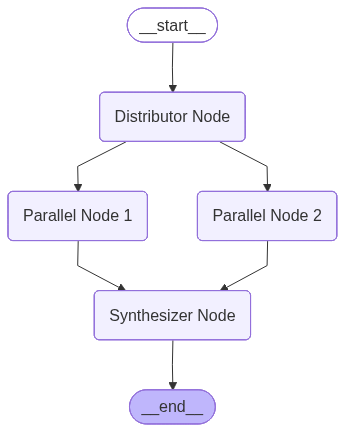
In Parallelization, there is a Distributor and an Aggregator Node. Parallelization runs multiple branches at once (conceptually or literally in parallel).
A distributor or router fans out to several nodes; each does independent work (e.g. different subqueries, or different document chunks); a synthesizer node then aggregates results into one answer.
State: State often uses a reducer (e.g. Annotated[list, add]) to collect results from parallel nodes. The graph has one entry into the parallel nodes (e.g. same state sent to each), and edges from each parallel node into a single synthesizer node that merges and optionally calls an LLM for a final summary.
workflow = StateGraph(WorkflowState)

# ==================== STEP 1: Define State ====================
class WorkflowState(TypedDict):
    """State that gets passed between nodes"""
    original_text: str
    node_1_called: bool
    node_2_called: bool
    decider: float
    result_text: Annotated[str, add]


workflow.add_node("Distributor Node", distributor_node)
workflow.add_node("Parallel Node 1", summarize_node)
workflow.add_node("Parallel Node 2", translate_node)
workflow.add_node("Synthesizer Node", synthesizer_node)
workflow.set_entry_point("Distributor Node")
workflow.add_edge("Distributor Node", "Parallel Node 1")
workflow.add_edge("Distributor Node", "Parallel Node 2")
workflow.add_edge("Parallel Node 1", "Synthesizer Node")
workflow.add_edge("Parallel Node 2", "Synthesizer Node")
workflow.add_edge("Synthesizer Node", END)
app = workflow.compile()
With LangGraph you can run parallel nodes via async invocation or by structuring the graph so multiple edges leave the distributor; the runtime can execute independent nodes in parallel. The synthesizer sees all partial results and produces the final output.
Use cases:
- 1. RAG with subqueries: Break the user query into multiple subqueries, run retrieval for each in parallel, then merge and rank results before generating the answer.
- 2. Long-document summarization: Split the document into pages, summarize each page in parallel, then aggregate the chunk summaries into one coherent summary.
Implementation: View on GitHub
Summary
Static workflows are useful for tasks where the path of execution is known in advance. They are complex patterns—not simple function calls—that orchestrate multiple steps, branches, or parallel runs in a defined way.
Workflow builders such as n8n, Zapier, and UnifyApps provide exactly this: visual or low-code environments to design and run these workflow patterns without writing graph code from scratch.