Agentic Patterns in AI Systems
AI agents and agentic workflows are everywhere. A useful way to build them is to follow agentic patterns reusable blueprints that separate fixed workflow steps from more dynamic, model-driven behaviour. This post covers four core agentic patterns:
1. Reflection,
2. ReAct Tool-Use,
3. Orchestrator–Worker
4. Multi-Agent
with concrete LangGraph-style structure and examples.
All implementation are done from scratch using first-principles calling just the /chat/completions API and practical LangGraph implementations.
Prerequisites: Basic understanding of LangGraph, /chat/completions API.
Code Examples: View on GitHub ↗
1. Reflection
Generate → critique → refine
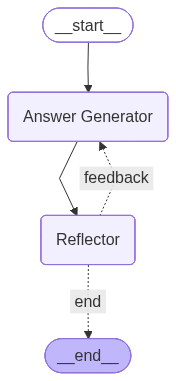
In the Reflection pattern, there are 2 components - Answer generator and Reflector. The answer generator produces an answer, then the reflector step provides feedback on that answer (e.g. tone, correctness, completeness). A decision node either sends control back to the answer generator for another pass or ends the flow.
This creates a simple self-improvement loop: generate → critique → refine (or finish).
State: In LangGraph the state tracks query, feedback, messages (accumulated with a reducer), answer, and max_iterations to cap retries. The feedback node asks an LLM to evaluate the current answer (e.g. “provide feedback on completeness wrto query; if all good, return empty feedback”). The decision node checks: if feedback is empty or max_iterations is exceeded, go to END; otherwise return to the LLM node.
from langgraph.graph import StateGraph, START, END
from operator import add
from typing import TypedDict, Annotated

class ReflectionState(TypedDict):
    query: str
    feedback: str
    messages: Annotated[list[dict], add]
    answer: str
    max_iterations: int

def llm_node(state: ReflectionState) -> ReflectionState:
    # Answer Generator
	query = state["query"]
	messages = state["messages"]
	feedback = state["feedback"]
	if len(messages) == 0:
		prompt = f"Can you help answer this query to the best of your knowledge: {query}"
		new_message = {"role": "user", "content": prompt}
	else:
		prompt = f"The message contains the query and its response, here is a feedback based on which you need to tune your answer. Feedback: {feedback}"
		new_message = {"role": "user", "content": prompt}
	messages.append(new_message)
	response = client.chat.completions.create(model=model, messages=messages)
	answer = response.choices[0].message.content
	answer_message = {"role": "assistant", "content": answer}
	return {"messages": [new_message, answer_message], "answer": answer}

def provide_feedback(state: ReflectionState) -> ReflectionState:
	query = state["query"]
	answer = state["answer"]
	max_iterations = state["max_iterations"]
	prompt = f"For this query {query}, the model has generated an answer {answer}. Please provide some feedback on tone. Ask it to improve if required. If all look good generate empty \"\" feedback"
	response = client.chat.completions.create(model=model, messages=[{"role": "user", "content": prompt}])
	return {"feedback": response.choices[0].message.content, "max_iterations": max_iterations + 1}


graph = StateGraph(ReflectionState)
graph.add_node("Answer Generator", llm_node)
graph.add_node("Reflector", provide_feedback)
graph.add_edge(START, "Answer Generator")
graph.add_edge("Answer Generator", "Reflector")
graph.add_conditional_edges("Reflector", decision_node, {
    "feedback": "Answer Generator",
    "end": END
})
compiled_graph = graph.compile()
On the first pass, the LLM gets only the user query. On later passes, it receives the same query plus the feedback string so it can tune the answer. Reflection is useful for code (generate → run → use errors as feedback), document drafting (write → critique → revise), or any task where a second “review” step improves quality.
Use cases:
- 1. Code Refinement: Write code → execute it → use error traces as feedback for improvements in the next iteration.
- 2. Information retrieval (IR): Retrieve initial results → grade them → refine iteratively before returning the final response.
Implementation: View on GitHub
2. ReAct Tool-Use
Reasoning + acting with tools
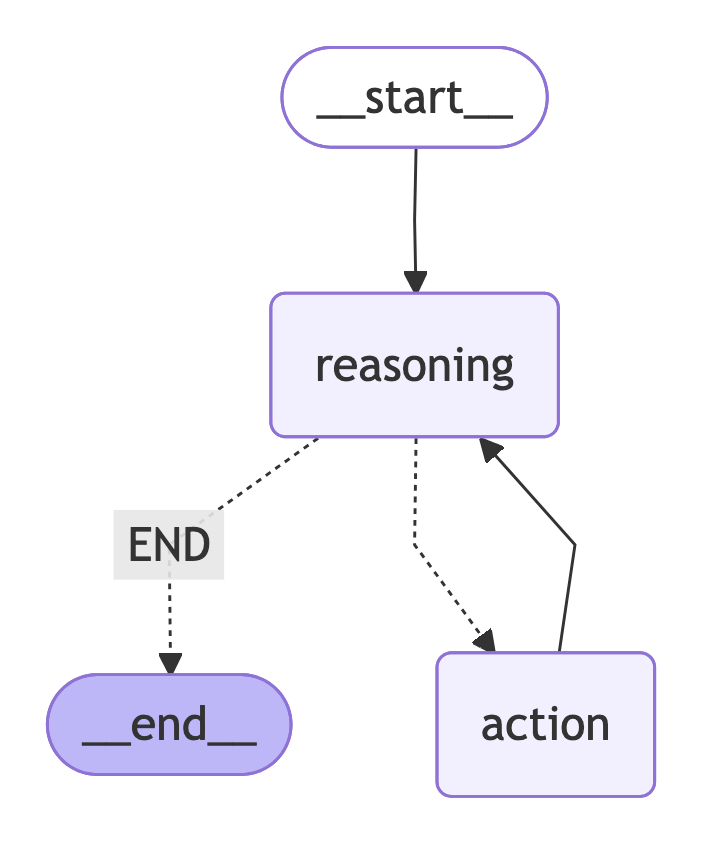
ReAct (Reasoning + Acting) combines chain-of-thought reasoning with tool calls. The model reasons about the query, optionally calls tools (e.g. search, calculator, API), receives results, and repeats until it has enough information to answer or hits a max iteration limit.
These tool calls can either be with or without MCP support
Research Paper: ReAct: Synergizing Reasoning and Acting in Language Models
State: In LangGraph the state tracks query, messages, reasoning, tool_calls, tool_call_responses, answer, iterations, and a session (e.g. MCP ClientSession) for listing and invoking tools. The reasoning node calls the LLM with the current messages and a tool list (e.g. from session.list_tools()). The model can return tool_calls; the action node runs them via session.call_tool() and appends tool results to messages. The decision node then routes: if there are no tool calls or iterations > max, go to END; else go back to the reasoning node.
class ReactState(TypedDict):
    query: str
    messages: list[dict]
    reasoning: str
    tool_calls: bool
    tool_call_responses: list
    answer: str
    iterations: int
    session: ClientSession

async def reasoning_node(state: ReactState) -> ReactState:
    prompt = """You are a very good reasoning agent which is capable of doing reasoning and calling different tools
    for action. Take the output of tools and generate an answer for the query. If multiple tool calls are required
    then you can call multiple available tools to find the answer. If no tool call required then answer directly.
    """

    response = client.chat.completions.create(messages=messages, model=model, tools=tools, tool_choice="auto")
    store_tool_call = []

    if response.choice[0].finish_reason == "tool_call":
        tool = response.choice[0].tool_call
        store_tool_call.append({
            "tool_call_id": tool.id,
            "tool_name": tool.function.name,
            "tool_arguments": json.loads(tool.function.arguments)
        })


async def action_node(state: ReactState) -> ReactState:
	tool_calls = state.get("tool_calls", [])
	session = state["session"]
	tool_call_responses = []
	for tool in tool_calls:
		tool_name = tool["tool_name"]
		tool_arguments = tool["tool_arguments"]
		response = await session.call_tool(tool_name, tool_arguments)
		tool_call_responses.append(response)
	return {"tool_call_responses": tool_call_responses}


graph = StateGraph(ReactState)
graph.add_node("reasoning", reasoning_node)
graph.add_node("action", action_node)
graph.add_edge(START, "reasoning")
graph.add_conditional_edges("reasoning", decision_node, {"END": END, "action": "action"})
graph.add_edge("action", "reasoning")
compiled_graph = graph.compile()
Tools are passed to the LLM as function declarations (name, description, parameters). The model emits tool_calls; the action node executes them and adds tool messages to the conversation. This loop continues until the model responds with a final answer (no tool calls) or the iteration cap is reached. ReAct is ideal for question-answering with search, calculators, or any external API the agent needs to “use” during reasoning.
Use cases:
- 1. Calling external APIs via MCP — tools exposed through Model Context Protocol, invoked by the agent during reasoning.
- 2. Executing remote DB queries in a sandbox — run read/write queries in an isolated environment and use results in the answer.
Implementation: View on GitHub
3. Orchestrator–Worker
Central orchestrator + specialized workers
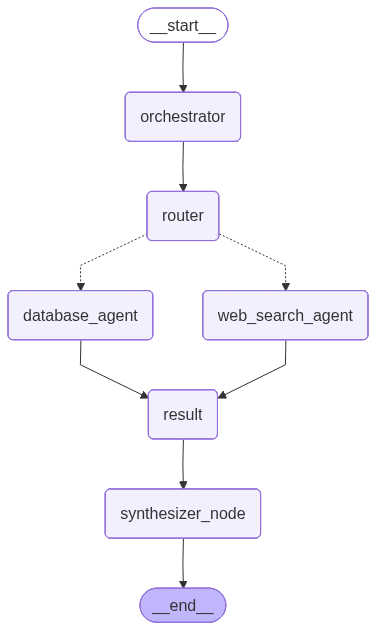
The Orchestrator–Worker pattern has a central orchestrator that parses the user query and produces a list of sub-tasks, each assigned to a specialized worker agent. Workers run (often in parallel via LangGraph’s Send API), and a synthesizer node aggregates their results into a single answer.
Each Worker can be implemented as a separate agent which runs in parallel. Here each agent can be also be built with ReAct Tool-Use pattern with Reflection
State: In LangGraph the state tracks query, workers (Agent name + description), messages, result (reducer list of {source, answer}), session, and final_answer.
The orchestrator node uses an LLM with structured output (e.g. Pydantic Workers with name and query per worker) to break the query into worker-specific sub-queries. The router returns Send(worker.name, {"query": worker.query}) for each active worker, fanning out to nodes like Web-Search Agentand Knowledge-Base. Each worker node runs its agent (with its own tools and prompt), and results are collected via the reducer. The synthesizer node takes the combined results and the original query and produces the final answer.
from langgraph.graph import StateGraph, START, END
from langgraph.types import Send

def router(state: OrchestratorWorkerState) -> List[Send]:
    active_workers = state.get("active_workers", [])
    return [Send(worker.name, {"query": worker.query}) for worker in active_workers]


def synthesizer_node(state: OrchestratorWorkerState) -> OrchestratorWorkerState:
	result = state.get("result", [])
	query = state.get("query")
	system_prompt = """You are a synthesizer agent which is able to understand the answers generated from different sources
and create a final response based from them. You are also given the query for which you have to generate the answer"""
	if not result:
		if len(state.get("active_workers", [])) == 0:
			formatted_result = "No workers were called for the given query"
		else:
			formatted_result = "Some issue occurred as no results are generated"

	else:
		formatted_result = "\n\n".join([str(res) for res in result])
	messages = [
		{"role": "system", "content": system_prompt},
		{"role": "user", "content": f"Query: {query}\n\nSub-worker results: {formatted_result}"}
	]
	response = client.chat.completions.create(
		model=model,
		messages=messages
	)
	return {"final_answer": response.choices[0].message.content}

graph = StateGraph(OrchestratorWorkerState)
graph.add_node("orchestrator", orchestrator_node)
graph.add_node("router", router_node)
graph.add_node("web_search_agent", tavily_agent)
graph.add_node("database_agent", knowledge_base_agent)
graph.add_node("result", result_node)
graph.add_node("synthesizer_node", synthesizer_node)
graph.add_edge(START, "orchestrator")
graph.add_edge("orchestrator", "router")
graph.add_conditional_edges("router", router, ["web_search_agent", "database_agent"])
graph.add_edge("web_search_agent", "result")
graph.add_edge("database_agent", "result")
graph.add_edge("result", "synthesizer_node")
graph.add_edge("synthesizer_node", END)
compiled_graph = graph.compile()
Workers can be implemented as async functions that receive query, call an LLM with domain-specific tools (e.g. web_search, database tool), and return {"result": [{"source": agent_type, "answer": ...}]}. The orchestrator’s prompt describes each worker’s role so the LLM can route and decompose the user request correctly. Use cases include “plan a trip” (calendar + travel + booking workers) or “answer from web + database” (Google Search + DB workers).
Use cases:
- 1. Multi-Agent Question Answering: What is the weather in Abu-Dhabi tomorrow ? How many meetings are scheduled in my calender today ?
Implementation: View on GitHub
4. Multi-Agent
Specialized agents with handoffs
Multi-Agent systems are the most complex to implement to get it right. It requires careful design of individual agents and handoff strategy.
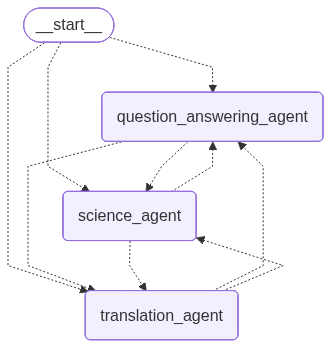
In the Multi-Agent pattern, several specialized agents collaborate. Each agent has its own system prompt and tools; handoff is implemented as a tool that passes control to another agent.
The graph cycles through an agentic node that invokes the current agent’s LLM with both core tools and handoff tools; when the model calls a handoff tool, the next node is set to the target agent.
State: Typically holds iterations, session, messages, answer, query, tool_calls, handoff_message, and current_state (current agent name).
Each agent is created with core_tools (e.g. question_answering_tool, science_tool, translation_tool) and handoff_tools (e.g. create_handoff_tool(agent_name="science_agent")). The agent node calls the LLM with core_tools + handoff_tools.
If the model invokes a handoff tool, the node records the target agent and returns; the conditional edges then route to that agent. If the model returns a final answer (no handoff), the graph goes to END.
class MultiAgentState(TypedDict):
	iterations: int
	session: ClientSession
	messages: list[str]
	answer: str
	query: str
	tool_calls: list[Any]
	handoff_message: str
	current_state: str


class Agent(TypedDict):
	name: str
	system_prompt: str
	core_tools: list[str]
	handoff_tools: list[dict]
	tool_list_json: list[dict]

def conditional_edges(state: MultiAgentState) -> str:
    iterations = state["iterations"]
    handoff_message = state.get("handoff_message", "")
    answer = state.get("answer")
    if iterations > max_iterations or answer:
        return "END"
    return "continue"

graph = StateGraph(MultiAgentState)
graph.add_node("question_answering_agent", question_answering_agent)
graph.add_node("science_agent", science_agent)
graph.add_node("translation_agent", translation_agent)
graph.add_edge(START, "question_answering_agent")
graph.add_conditional_edges("question_answering_agent", conditional_edges, {
    "END": END,
    "continue": "question_answering_agent",
    "science_agent": "science_agent",
    "translation_agent": "translation_agent"
})
graph.add_conditional_edges("science_agent", conditional_edges, {
    "END": END, "continue": "science_agent",
    "question_answering_agent": "question_answering_agent",
    "translation_agent": "translation_agent"
})
graph.add_conditional_edges("translation_agent", conditional_edges, {
    "END": END, "continue": "translation_agent",
    "science_agent": "science_agent",
    "question_answering_agent": "question_answering_agent"
})
compiled_graph = graph.compile()
Use cases:
- 1. Plan a 3-day itinerary to Paris (budget $5000): Orchestrator delegates to Calendar Agent, Travel Agent, Booking Agent, etc., and synthesizes a single plan.
Implementation: View on GitHub
Where LangGraph fits
If you have continued this far, you must have got some idea about how LangGraph facilitates everything. It is the building block for all the agentic patterns
LangGraph gives you the primitives to implement these patterns as executable graphs: State (TypedDict with optional reducers), Nodes, Edges, and Conditional edges (including fan-out via Send). The compiled graph is runnable with graph.invoke(input) or ainvoke for async. You can combine patterns—e.g. Orchestrator–Worker with tool-using workers, or Multi-Agent with reflection in each agent. Start simple, add evals, and iterate.